Fog Lights, False Edges: Putting Atmosphere Into Green-Screen Scenes Without Poisoning the Key
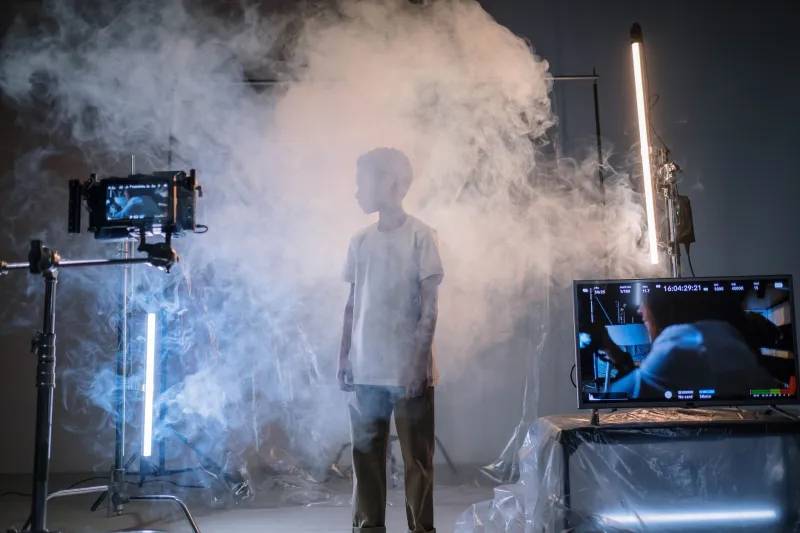
Atmosphere is one of the fastest ways to make a green-screen shot feel like it was captured somewhere real. A bit of drifting haze behind a presenter, a curl of smoke across a doorway, a soft glow around a practical lamp — suddenly the composite has depth. The trouble is that the same particles that sell the illusion to the viewer are also tiny grey troublemakers for your key. In a small UK room, with a modest screen and a couple of lights, haze can turn a clean matte into a mushy outline in minutes.
This is not a reason to avoid atmosphere. It is a reason to treat it as a separate problem from the key. Shoot the plate with the haze you want, but plan for what that haze does to edges, spill and contrast. Here is how I approach it in a garage or a spare bedroom without buying a commercial smoke rig.
Why haze and green screen fight each other
Chroma keying works on colour difference. Your software looks at the green and asks what is screen and what is subject. Haze sits in the air between the two. It catches light, scatters it and creates a thin veil of pale grey-green over everything in the background. That veil lowers saturation and contrast exactly where the key needs a clean, consistent colour.
The problem gets worse at the edge. A hard edge between subject and screen is easy to key. A soft, hazy edge is ambiguous. The software sees a gradient of green and skin tone and starts guessing. You get fringing, chattering edges and a matte that needs more cleanup than the shot is worth.
Spill is the other issue. Haze bounces green light back onto the subject, especially on shoulders, hair and anything shiny. It also makes the screen look uneven because the fog is never perfectly distributed. You can key a patchy screen, but you will spend your evening fixing it.
A cheap DIY haze plan for a small room
You do not need a £400 hazer. For a small room, a basic fog machine from a party shop or online retailer can be enough, but it must be controllable. The cheap ones blast a thick cloud and then nothing. If yours has no remote, put it on a switched extension lead and keep it outside the frame. Better still, use a hazer or a fogger with a timer if you can borrow one.
For a gentler look, a small ultrasonic diffuser can create a slow, drifting mist. It will not fill a garage, but it is perfect for a tabletop insert or a close-up. A spray bottle with a very fine mist can also work, though it settles quickly and can leave droplets on the screen. Test on a spare bit of fabric before you commit.
The key is to keep the haze moving and thin. Put a fan on the lowest setting behind the camera, aimed slightly across the set, not directly at the screen. You want a slow drift, not a weather event. Give the room five minutes to settle before you roll. If you can see a visible cloud, it is probably too thick. A little goes a long way on camera, especially with a backlight.
Lighting adjustments that protect the edge
Haze shows up most when light hits it from the side or behind. That is also what makes it look good. The trick is to separate the haze light from the key light. Use a small backlight or practical lamp to pick out the atmosphere, but keep it off the screen itself. If the backlight hits the green, you will create a bright, uneven patch that the key hates.
Keep your subject key soft but controlled. A large diffuser close to the subject gives a clean wrap without blasting the screen. Avoid hard sources that create sharp shadows on the green; those shadows are harder to key when haze softens them further. If you need contrast, flag the screen rather than turning up the key.
Finally, check your exposure. Haze lifts the blacks and can make the whole frame look flat. Do not compensate by overexposing the screen. Expose the green consistently, then adjust the subject with lighting. A waveform monitor or zebras on your camera will save you from guesswork.
Keying and compositing fixes
In post, start with a clean plate. If you can, shoot ten seconds of the empty screen with the same haze and lighting. That gives your keyer a reference for the uneven background. Use it to create a garbage matte or to sample the screen colour in different areas.
Do not rely on a single key. Use a luma matte or a second key to isolate the haze edges if your software supports it. A light denoise before keying can help, but over-denoising will smear the edge. If the matte is chattering, try a slight blur on the matte, not the image, and then tighten the edge with a light wrap.
For spill, use a hue shift or a spill suppressor rather than desaturating the subject. Keep skin tones warm. If the haze has made everything look milky, add contrast back with a curve and a subtle grade. The goal is to make the atmosphere feel intentional, not like a mistake.
When to fake it in post
Sometimes the smartest move is to shoot clean and add atmosphere later. If you are working in a small room with a cheap screen and limited lights, haze can cost you more time than it saves. A clean key with a digital fog pass, a practical glow or a few drifting particles can look more controlled and is easier to revise.
Use post atmosphere when the shot is locked off, the camera move is simple, or the haze is only needed in the background. Use practical haze when the actor needs to interact with it, when light beams need to be visible, or when the scene depends on a real sense of air. There is no prize for suffering through a bad key just to say you did it on set.
The haze trap is real, but it is not a ban. Treat fog as a lighting element, not a background texture. Keep it thin, move it slowly, protect the screen and plan for a little extra compositing. Do that, and you can have the mood without the matte meltdown.